google.com, pub-2479148851417979, DIRECT, f08c47fec0942fa0 Quick Tips for Mac Geeks: Outlook for Mac
Showing posts with label Outlook for Mac. Show all posts

Tuesday, February 22, 2022

How to Go back to an older version of Microsoft outlook on a Mac 2022

If you just upgraded to version 16.xxx of Microsoft outlook on a Mac, you may need to revert back to the old one, here is how.


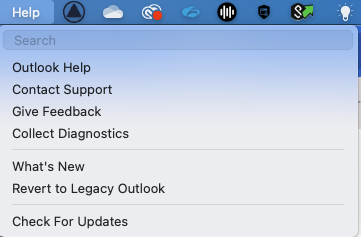
Step 1

Select Help Menu at the top and select revert to Legacy outlook then select revert

Step 2 

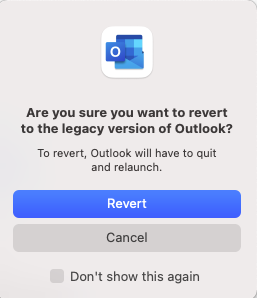
Click revert again in the next window shown below.

it may ask you for feedback you can let them know what was working for you.
Sunday, September 27, 2015

How to search your entire email in Microsoft Outlook for Mac - Hidden Feature


In Microsoft Outlook email program for Mac OS X it can be surprisingly hard to find the Search function to search all email accounts and all folders. There’s a search field that is visible, but it only searches the current folder.
Why Microsoft made the user interface choice to hide the ability to search is somewhat of a mystery to me, but here’s how you access all of the other search options in Outlook.


This works in outlook 2011 as well as outlook 2016 for the Mac

Folder – Searches the current folder only


Subfolders – Searches within the current folder and subfolders


All Mail boxes – Searches all email in Multiple accounts and folders


All Outlook Items – Searches all items in Outlook, including email, calendar entries, to-do entries, address book contacts, etc.

Adsense

google.com, pub-2479148851417979, DIRECT, f08c47fec0942fa0